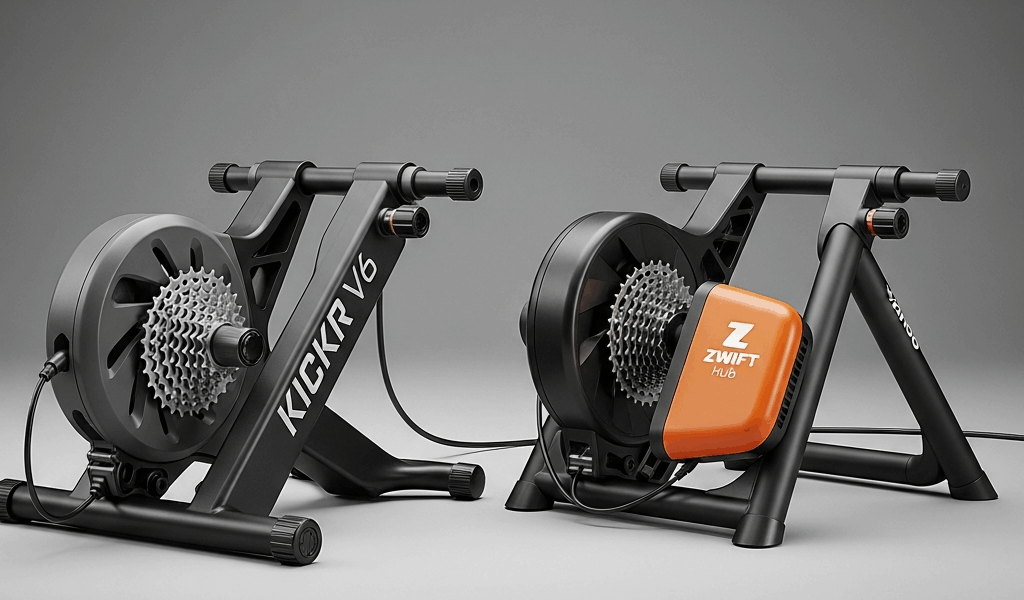
Wahoo KICKR V6 vs Zwift Hub — Which Smart Trainer Is Worth It?
The Wahoo KICKR V6 vs Zwift Hub debate has gotten messy with all the conflicting opinions flying around. When Zwift dropped the Hub at $499, it genuinely rattled the smart trainer market. Suddenly the sub-$500 tier wasn’t just wobbly flywheels and questionable power readings. That changes the math. But it doesn’t automatically hand the Hub a win.
The KICKR V6 — Wahoo’s 2022-generation direct-drive trainer, retailing around $1,199 — and the Zwift Hub (still widely available at $499–$549, with the updated Hub One now circulating alongside it) represent genuinely different philosophies. One is a premium, platform-agnostic workhorse built to last half a decade. The other is a brilliantly priced ecosystem play from the company that runs the dominant indoor cycling platform. That’s what makes this comparison so interesting to cyclists trying to spend their money wisely.
Trainers Compared in This Article
This section includes affiliate links. We may earn a commission at no extra cost to you.
Wahoo KICKR V6 Smart Indoor Trainer
Premium direct-drive trainer with ±1% accuracy and whisper-quiet operation
$1,199.99
Check Price on AmazonZwift Hub Smart Indoor Cycling Trainer
Best-value direct-drive trainer with native Zwift integration
$499.99
Check Price on AmazonThis article includes affiliate links. We may earn a commission at no extra cost to you.
Price vs Performance at a Glance
Before anything else, here’s a side-by-side so you’re not hunting for numbers mid-article.
| Feature | Wahoo KICKR V6 | Zwift Hub |
|---|---|---|
| Price (USD) | ~$1,199 | ~$499 |
| Power Accuracy | ±1% | ±2.5% |
| Max Gradient Simulation | 20% | 16% |
| Flywheel Weight | 16 lbs (7.3 kg) | ~6.7 lbs (3 kg) |
| Noise Level (approx.) | ~60–62 dB | ~64–67 dB |
| Connectivity | ANT+, ANT+ FE-C, Bluetooth (x2) | ANT+, ANT+ FE-C, Bluetooth (x1) |
| App Compatibility | All major platforms | All major platforms |
| Auto Calibration | Yes (SpinDown + automatic) | Manual SpinDown |
That $700 gap is the headline — and it’s real. It matters enormously if you’re not billing indoor training as a business expense or chasing race-level performance. But price alone doesn’t tell the full story here. Some of the performance differences between these two trainers are significant. Others are basically irrelevant depending on how you actually ride.
Ride Feel and Accuracy
Frustrated by vague online comparisons that never actually answered my questions, I started paying obsessive attention to both trainers — timing intervals, comparing wattage outputs across sessions, noting exactly when the ride feel started to diverge. The flywheel difference shows up within the first ten minutes. The KICKR’s 16-pound flywheel builds momentum that mimics outdoor inertia in a way the Hub’s lighter unit simply doesn’t match. Sprint out of a corner on the KICKR and you feel yourself accelerating into something real. On the Hub, hard accelerations feel slightly more abrupt — the resistance responds quickly, but the coasting sensation afterward is thinner.
That said — and this genuinely matters — most riders doing zone 2 base work, structured intervals, or casual group rides on Zwift won’t find this difference ride-ending. It’s noticeable. It’s not catastrophic.
Power Accuracy — ±1% vs ±2.5%
Wahoo claims ±1% power accuracy on the KICKR V6. Zwift claims ±2.5% on the Hub. In real-world testing from DC Rainmaker and GPLama, the Hub actually outperforms its spec — often landing closer to ±2% under consistent conditions. The KICKR holds its spec reliably, and automatic calibration — it adjusts based on temperature and spindown data without you doing anything — gives Wahoo a clear consistency edge.
Does ±1% vs ±2.5% matter to you? If you’re training with a power meter on your outdoor bike and want your indoor numbers to align for TSS tracking and periodization — honestly, yes. If you’re riding Zwift for fitness and joining the occasional community event — no. A 2.5% variance isn’t going to derail your season.
Spare yourself the wrong turn I took — I assumed early on that the Hub’s power readings would drift significantly over long rides without manual recalibration. After a proper 15-minute warm-up before any spindown, the drift was minimal. Skip the warm-up and you’ll see inconsistencies. That’s physics, not a flaw. The KICKR handles this more automatically, which is a genuine quality-of-life win — especially at 5:45 AM when you’re not thinking clearly.
Gradient Simulation — 20% vs 16%
The KICKR V6 simulates gradients up to 20%. The Hub tops out at 16%. On most Zwift routes — including the longer climbs on Alpe du Zwift — you won’t exceed 12–13%. Watopia KOM segments occasionally hit 14–15%. Practically speaking, 16% covers the vast majority of what you’ll encounter riding normally. The 20% ceiling starts to matter if you’re training specifically for mountain stages or running simulation software with custom extreme terrain — think Ventoux replicas or bespoke courses built around Alpine profiles.
App Ecosystem Lock-In
Quick callout up front — because for a lot of people, the ecosystem question is the actual deciding factor, not flywheel weight or gradient ceilings.
But what is ecosystem lock-in, really? In essence, it’s the risk that a piece of hardware becomes less useful if you change platforms. But it’s much more than that — it’s about where your training data lives, which apps feel native versus clunky, and how much friction you’re willing to tolerate.
The Zwift Hub is made by Zwift. It pairs natively and seamlessly with Zwift — sometimes faster than third-party trainers pair, apparently. But the Hub also works with TrainerRoad, Wahoo SYSTM, Rouvy, Kinomap, and every other ANT+/Bluetooth-compatible platform. It is not technically locked to Zwift. In practice, though, the product was clearly designed with Zwift as the primary use case. The marketing is Zwift-forward. The support documentation is Zwift-forward. Zwift’s subscription has already moved to $19.99/month — if it rises again, or if Zwift makes platform decisions you disagree with, you’re holding hardware built to serve that ecosystem first.
What KICKR V6 Offers on Connectivity
The KICKR V6 supports dual Bluetooth connections simultaneously — Zwift running on your iPad, a heart rate app logging on your phone, no manual disconnecting required. The Hub supports one Bluetooth connection at a time. Small thing until it isn’t. Running Zwift on one device while logging to TrainingPeaks or Garmin Connect on another is a standard setup for serious trainers — with the Hub, you’re routing one of those connections through ANT+, which means a USB dongle on most computers.
The KICKR also has a longer track record with Wahoo’s SYSTM platform and integrates tightly with TICKR heart rate monitors and ELEMNT head units. If you’re already in the Wahoo hardware ecosystem, the V6 slots in cleanly — no adapters, no workarounds, no afternoons spent troubleshooting Bluetooth conflicts.
Neither trainer locks you out of basic functionality. But the KICKR V6 is genuinely more flexible — and that flexibility costs nothing extra once you’ve paid the purchase price.
Noise and Apartment-Friendliness
This section matters more than most reviews acknowledge. A lot of indoor cyclists live in apartments or condos with shared walls, light floors, and sleeping partners who aren’t thrilled about early morning interval sessions.
The KICKR V6 runs at approximately 60–62 decibels during moderate effort. Wahoo improved the bearing and gear tolerances in the V6 compared to the V5 — reviewers have consistently noted the difference. The Zwift Hub runs a bit louder, approximately 64–67 dB in most independent tests. That 4–5 dB difference sounds small on paper. Decibels operate on a logarithmic scale, though — the Hub is roughly 1.5–2x as loud to the human ear as the KICKR V6 at similar wattages. Both trainers are noticeably quieter than wheel-on setups or older direct-drive units from five or six years ago. But if you’re training at 6:00 AM in a studio apartment, that gap matters.
While you won’t need a full soundproofed pain cave, you will need a handful of noise-management tools regardless of which trainer you choose. A trainer mat — the Wahoo KICKR Mat runs around $79, or a cheaper 6mm rubber gym mat works fine — is basically mandatory if you have downstairs neighbors. Anti-vibration riser blocks like the Feedback Sports Omnium mat or generic anti-vibration pads cut down the low-frequency structural noise that travels through floors even when the trainer itself is quiet.
Verdict on noise: the KICKR V6 is measurably and noticeably quieter. For apartment dwellers, this alone might justify a meaningful chunk of the price premium.
The Verdict — Who Should Buy Which
I’ve watched cyclists tie themselves in knots over this decision for months. Let me cut through it.
Buy the Zwift Hub If —
- You are primarily or exclusively a Zwift rider and plan to stay that way
- Your budget is firm at under $600 and won’t stretch
- You’re new to smart trainers and aren’t sure how often you’ll actually use it
- Power accuracy at the 2.5% level is sufficient for your training goals
- You’re comfortable managing one Bluetooth device at a time
The Zwift Hub at $499 might be the best value proposition in indoor cycling hardware right now, as this category requires a certain price-to-performance threshold to be worth anyone’s time. That is because premium trainers held this market hostage for years with four-figure price tags and very little competition. Frustrated by that pricing stranglehold, the Hub is the trainer I’d recommend to a friend who trains casually to seriously, rides Zwift through the winter, does group events, and builds fitness without needing race-caliber power accuracy. The slightly louder noise floor and lighter flywheel feel are real. They don’t prevent a good training session.
Buy the Wahoo KICKR V6 If —
- You train on multiple platforms — Zwift, TrainerRoad, SYSTM, Rouvy, or others
- Power accuracy matters for periodization, TSS matching, or race preparation
- You live in an apartment and need the quietest direct-drive option available
- You want dual Bluetooth connectivity without managing ANT+ dongles
- You’re buying a 5–7 year piece of equipment and want the build quality to justify it
- You’re training for events with extreme gradients and want the full 20% simulation ceiling
The KICKR V6 is not cheap — $1,199 is a real purchase decision. But the build quality, whisper-quiet operation, automatic calibration, dual Bluetooth stack, and platform flexibility are genuinely worth paying for if you’re a serious rider planning to use this thing hard for years. Here’s the math I did: training 8–10 hours a week indoors, amortize that $700 premium over three years. That’s roughly $4.50 per week for noticeably better ride feel, tighter accuracy, quieter operation, and zero platform anxiety. When I framed it that way — honestly — it stopped feeling like a premium and started feeling like a fair trade.
This new idea of legitimate sub-$500 smart trainers took off several years after the direct-drive category became mainstream and eventually evolved into the competitive two-tier market enthusiasts know and debate today. That’s genuinely good news. The worst outcome here isn’t buying either of these trainers — both are capable, well-built products. The worst outcome is buying the wrong one for your actual use case and resenting it six months in. Committed Zwift-only rider on a budget? Hub. Multi-platform serious trainer building a long-term indoor setup? KICKR V6. The market finally gave us two clearly distinct, clearly capable choices at different price points. That’s a win — full stop.



Stay in the loop
Get the latest cycle train central updates delivered to your inbox.