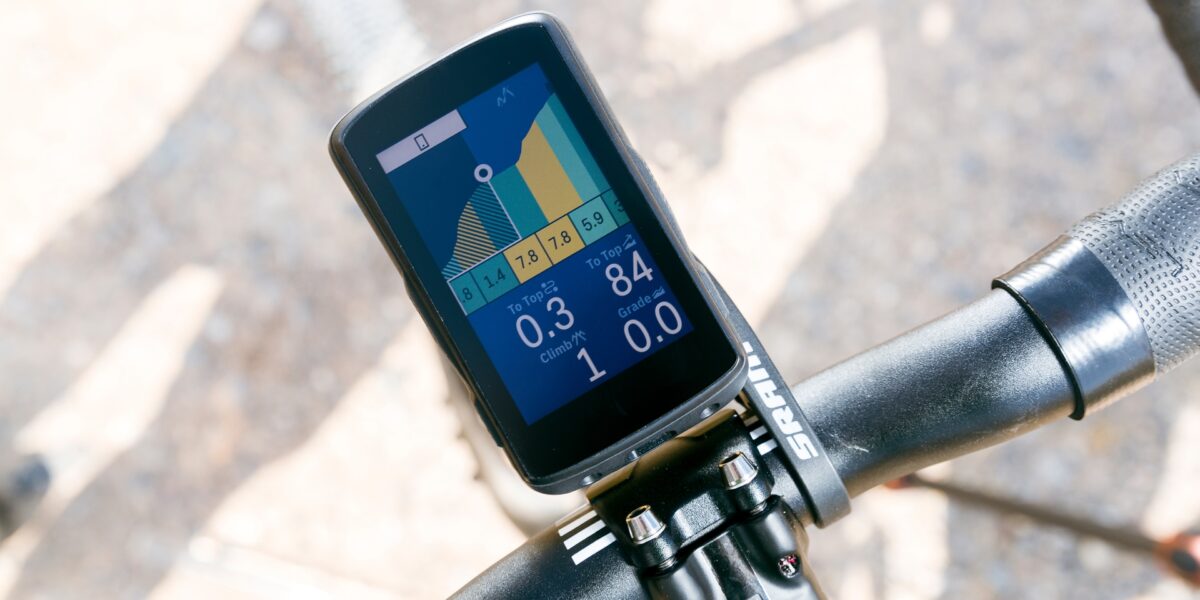
For most serious cyclists, the best bike computer is not the largest or most expensive one—it is the unit whose controls, mapping, battery life, sensors, and training ecosystem match the rides you actually do. Our 2026 shortlist is Garmin Edge 1050 for the fullest premium feature set, Wahoo ELEMNT BOLT 3 for compact button control, Wahoo ELEMNT ROAM 3 for navigation without flagship size, and Hammerhead Karoo for a phone-like touchscreen and mapping experience.
CycleTrainCentral has not laboratory-tested these devices. This comparison uses current manufacturer specifications and support documentation, with advertised battery figures treated as maximums rather than guaranteed ride time. Prices, firmware, features, and bundles can change; verify the current product page before buying.
Best bike computers for serious cyclists: quick comparison
| Computer | Best for | Display and controls | Published battery |
|---|---|---|---|
| Garmin Edge 1050 | Premium training, navigation, and group features | 3.5-inch color touchscreen plus buttons | Up to 20 hours demanding use; 60 hours battery saver |
| Wahoo ELEMNT BOLT 3 | Racing and riders who prefer buttons | 2.3-inch color display; six physical buttons | Up to 20 hours |
| Wahoo ELEMNT ROAM 3 | Long navigation and a larger Wahoo screen | 2.8-inch color touchscreen plus buttons | Up to 25 hours |
| Hammerhead Karoo | High-resolution maps and responsive touchscreen use | 3.2-inch touchscreen; 292 pixels per inch | Check current firmware and manufacturer estimate |
Battery life varies with backlight, navigation, temperature, connected sensors, rerouting, alerts, and wireless connections. Build at least a 30% reserve into the longest ride you expect to record.
Garmin Edge 1050: best premium all-rounder
The Garmin Edge 1050 combines a 3.5-inch 480×800 color touchscreen with training metrics, navigation, road-hazard reports, GroupRide features, Garmin Pay, a speaker, and on-device course creation. Garmin lists 20 hours in demanding use and up to 60 hours in battery-saver mode.
Choose it when you want the broad Garmin training ecosystem, detailed mapping, a large bright screen, and integrations with power meters, heart-rate sensors, smart trainers, and compatible Varia radar devices. Its trade-offs are price, 161-gram weight, and shorter normal-mode battery life than the transflective Edge 1040 Solar. Ultra-distance riders should compare the 1040 Solar rather than assuming the newer flagship is automatically better.
Wahoo ELEMNT BOLT 3: best compact button-controlled computer
The ELEMNT BOLT 3 uses a 2.3-inch color display, six physical buttons, dual-band GNSS, 32GB storage, ANT+, Bluetooth, Wi-Fi, USB-C charging, and IPX7 water protection. Wahoo lists an 85-gram weight and up to 20 hours of battery life.
The BOLT 3 is the logical choice for racers and riders who want tactile controls in gloves or rain. Its smaller screen saves cockpit space and weight but is less comfortable for frequently studying complex maps. If you mostly follow planned routes and want clear data pages without a touchscreen, that compromise can be worthwhile.
Wahoo ELEMNT ROAM 3: best Wahoo navigation choice
The ELEMNT ROAM 3 expands to a 2.8-inch 320×480 touchscreen, 64GB storage, dual-band GNSS, voice turn instructions, free downloadable world maps, ANT+, Bluetooth, Wi-Fi, and up to 25 hours of stated battery life. It weighs 109 grams.
Choose the ROAM 3 over the BOLT 3 when navigation readability and battery headroom matter more than minimal size. It retains physical zoom controls while adding touch interaction. Wahoo’s 2026 firmware notes include battery and performance improvements, so install current firmware before judging runtime or stability.
Hammerhead Karoo: best high-resolution mapping interface
The current Hammerhead Karoo uses a 3.2-inch high-resolution touchscreen, multi-band GNSS, 64GB storage, 4GB RAM, USB-C, and an IP67 enclosure. Hammerhead lists a 118.1-gram device weight and describes extensive shock, vibration, temperature, and environmental testing.
Karoo belongs on the shortlist for riders who prioritize detailed map rendering and a responsive, phone-like interface. Confirm compatibility with every critical sensor, drivetrain control, training platform, and mount before switching ecosystems. Also check the current battery estimate after recent firmware updates; navigation hardware is useful only if it covers your longest event with reserve.
Do you need maps, or only ride data?
A GPS computer with full maps is valuable for unfamiliar routes, gravel events, touring, and rerouting. If you ride known roads and only need speed, distance, cadence, heart rate, and power, a smaller computer can be cheaper, lighter, and easier to operate. Do not pay flagship prices for mapping you will never open.
For navigation, evaluate more than screen size:
- whether maps work offline;
- how easily routes sync from Strava, Komoot, Ride with GPS, or your preferred planner;
- whether the computer reroutes after a missed turn;
- how clearly it distinguishes the planned route from surrounding roads;
- whether buttons or touch controls work with gloves and rain;
- how much detail remains readable in direct sun.
Training features serious cyclists should compare
Nearly every high-end computer can record power, cadence, heart rate, and location. The meaningful differences are how it uses those data and how well it fits your existing platform. Before buying, list the functions you actually use: structured workouts, power targets, climbing profiles, stamina estimates, recovery guidance, race pacing, smart-trainer control, live segments, or multi-sport watch integration.
Verify ANT+ and Bluetooth support for each sensor. “Compatible with power meters” does not guarantee every advanced field or left/right metric from every model. If electronic shifting buttons control computer pages, confirm support for the exact drivetrain generation.
How much battery life do you need?
Use the longest plausible door-to-door duration, then add setup time, café stops, delays, and a reserve. A four-hour event does not require a 40-hour computer, but an all-day gravel race should not be planned against the manufacturer’s absolute maximum.
Battery performance generally falls in cold conditions and as a lithium-ion cell ages. Maximum brightness, constant rerouting, multiple sensors, Wi-Fi, audio prompts, and phone notifications can increase consumption. For an important event, update firmware well beforehand, charge fully, disable unnecessary features, and test a comparable ride rather than experimenting on race morning.
Touchscreen or buttons?
Touchscreens make maps and menus fast to explore. Physical buttons offer predictable control with full-finger gloves, sweat, rain, or rough terrain. Garmin Edge 1050 and Wahoo ROAM 3 combine touch and buttons; BOLT 3 intentionally uses buttons only. Try the actual device if possible, because interface preference matters more than a specification-table win.
Safety and privacy considerations
Live tracking and incident alerts can help a trusted contact, but they depend on configuration, connectivity, phone state, and compatible accounts. They are not substitutes for safe riding, route planning, identification, lights, or emergency communication where cellular service is unreliable.
Review location-sharing defaults before enabling public activity uploads. Hide home and workplace locations using your platform’s privacy controls, limit live links to trusted people, and install security updates. Use a tether on rough roads and verify the mount is compatible with the device rather than forcing a similar-looking quarter-turn interface.
Which bike computer should you buy?
- Choose Garmin Edge 1050 for the largest premium feature set, bright maps, Garmin training tools, and group functions.
- Choose Wahoo BOLT 3 for compact racing use, physical controls, and a simple Wahoo workflow.
- Choose Wahoo ROAM 3 for a larger Wahoo screen, touch navigation, voice prompts, and more battery headroom.
- Choose Hammerhead Karoo for a high-resolution, responsive mapping interface and confirm ecosystem compatibility first.
Buy from a seller with a clear return policy, then test navigation, sensors, syncing, controls, and battery drain before the return window closes. The best bike computer is the one you can read and operate safely while it reliably records the entire ride.




Stay in the loop
Get the latest cycle train central updates delivered to your inbox.