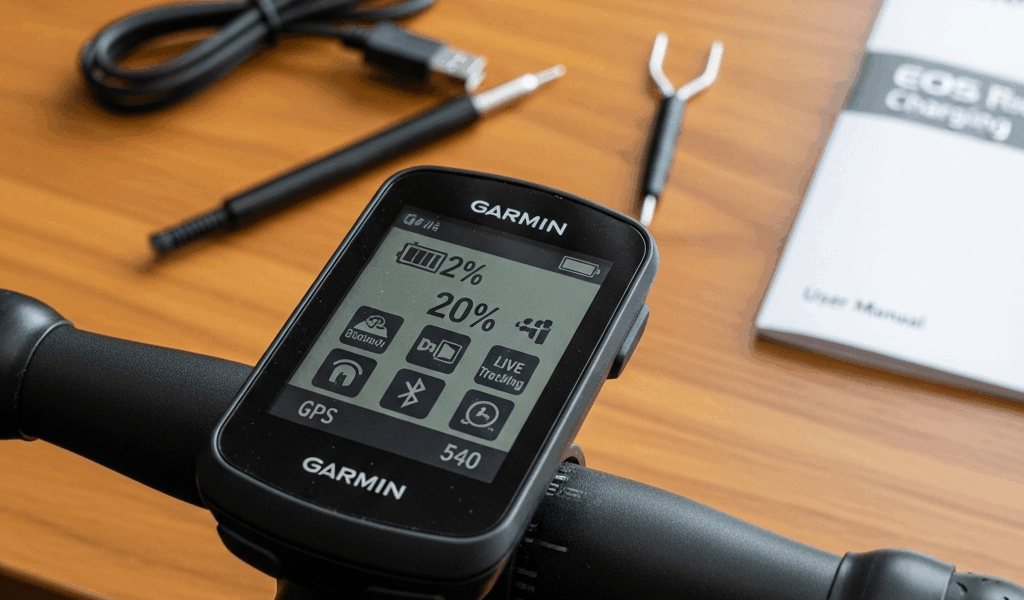
Why the Edge 540 Battery Dies Faster Than It Should
Edge 540 battery drain has shifted noticeably with all the conflicting advice flying around.
Here’s the short version: the Edge 540 ships with settings that prioritize features over runtime. Always-on GPS, a backlight that stays lit forever, live tracking pinging Garmin’s servers, Bluetooth connections left wide open — none of this is obvious until you’re 40 kilometers from home watching the battery icon flash red.
Most of the time, this isn’t a defective battery. It’s configuration. You can fix roughly 90% of these cases in under five minutes. Garmin doesn’t make that obvious anywhere in the manual or the setup wizard, which is its own problem.
Quick Fixes to Try First — Backlight and GPS Mode
Start here. These two settings alone account for most of the premature drain complaints I’ve seen in forums and heard from riding partners.
Backlight Brightness and Timeout
Open Settings > Display > Backlight. Two controls: brightness level and timeout duration.
Brightness should sit at 30–40% for outdoor riding — even in direct sunlight. You genuinely don’t need 100%. That’s a near-guarantee of battery death by midday. The timeout, meaning how long the screen stays lit after you stop touching it, should be 5 seconds maximum. I’d argue for 3 seconds if you’re not mid-race and checking splits constantly.
Here’s the actual math on this: backlight at 80% brightness with a 30-second timeout can cost you 8–12 hours of total battery life per charge. Drop to 30% brightness with a 5-second timeout, and you’re adding 10–15 hours back depending on which GPS mode you’re running. That’s not a small difference.
GPS Mode Selection
Navigate to Settings > System > GNSS. Four options: All Systems, GPS Only, UltraTrac, and GPS + GLONASS.
Most riders don’t need All Systems. That mode pings GPS, GLONASS, Galileo, and regional satellite systems simultaneously — maximum accuracy, maximum power draw. On a casual training ride, it’s overkill. Switch to GPS Only for everyday use. You lose maybe 1–2 meters of accuracy per kilometer. Battery life improves by 20–25%. Worth it.
Doing ultra-distance events? Use UltraTrac. It records position every 10 seconds instead of continuously — the resulting track looks a bit like connect-the-dots — but you can push past 40 hours on one charge. I tested this on a 200-kilometer gravel route last spring. The battery held through the whole thing, with room to spare.
GPS + GLONASS is technically a middle ground: better accuracy than GPS-only, worse battery life than GPS-only. Skip it unless you’re racing competitively and need the precision.
Turn Off Features You Are Not Using
Worth saying out loud. I wasted a solid hour in a forum thread about battery drain before realizing my own Edge 540 was broadcasting live tracking to five friends the entire time.
Disable Live Tracking
Open the Garmin Connect app. Tap the three-line menu, go to Settings > Paired Devices, find your Edge 540, and toggle off Live Tracking. That feature sends your real-time location and speed data to Garmin’s servers — and to anyone you’ve shared access with. Convenient for group rides. Terrible for battery life. Disabling it adds 6–8 hours of runtime, consistently.
Your completed ride still uploads afterward. You’re just killing the live broadcast.
Phone Notifications and Bluetooth
Go to Notifications inside the Edge 540 settings. Turn off incoming call alerts, text previews, and app notifications if you don’t actively need them during rides. Every notification wakes the Bluetooth radio — and that radio is hungry.
More aggressive move: in Garmin Connect, disable Auto Sync over Bluetooth entirely. The Edge 540 then only syncs when you manually tell it to or when it finds a known Wi-Fi network. That saves 3–5 hours per charge. Avoid the path I took and leave it syncing all day in your back pocket.
Wi-Fi Scanning
Your Edge 540 is probably passively hunting for Wi-Fi networks right now — even mid-ride. Tap Settings > Wi-Fi and toggle off Wi-Fi Scanning. You can still connect manually to your home network whenever you actually need to sync. The device just stops scanning constantly for open networks while you’re out on the road.
Incident Detection
But what is Incident Detection, exactly? In essence, it’s a crash-detection feature that pings emergency contacts if the accelerometer detects a sudden impact. But it’s much more than a passive feature — the accelerometer runs continuously to make it work. If you don’t use emergency contact alerts, go to Settings > Safety > Incident Detection and turn it off. Reclaims 1–2 hours of battery life right there.
When the Battery Still Drains — Check These Settings
You’ve cut the backlight, switched to GPS-only, killed live tracking. Battery is still dying after 8 hours. Look deeper.
Data Recording Frequency
Go to Settings > Recording > Record Interval. Two options: Smart and Every Second.
Smart records more frequently when your movement changes — climbing, descending, accelerating — and backs off on flat consistent terrain. Every Second captures every single data point regardless. Accurate? Yes. Also a battery killer — expect to lose 4–6 hours of total runtime with that setting enabled.
Use Smart for training rides. Reserve Every Second for races or structured testing where you genuinely need that granularity.
Map Detail Level
If you’re using onboard navigation, check Settings > Map > Map Detail. Higher detail levels force the Edge 540 to render and shade significantly more map data — that means more processor load, more battery draw. Set this to Standard or Simplified unless you’re navigating genuinely unfamiliar terrain where map clarity actually matters for safety.
Connected Sensors
Open Settings > Sensors & Accessories. Paired Bluetooth sensors — power meters, heart rate straps, cadence sensors — stay in discovery mode by default. If a sensor is unpaired or throwing connection errors, the Edge 540 keeps searching for it on a loop. That search drains the battery. Remove sensors you’re not using. If a sensor is paired but unreliable, unpair it completely and re-pair it fresh.
I’m apparently sensitive to ANT+ interference and a faulty cadence sensor once had my Edge 540 cycling through reconnection attempts every few seconds — battery dead in four hours flat. A $12 replacement sensor fixed it. Steer clear of where I went wrong.
If Nothing Works — It Might Be a Software or Hardware Issue
You’ve gone through every setting. Backlight at 30%. GPS-only mode. Live tracking off. Still dying in 6 hours of active riding. Time to look at firmware.
Update Firmware
Connect your Edge 540 to a computer via USB and open Garmin Express. Install any available firmware update. Garmin has released patches specifically targeting battery drain on the 540 — version 17.10 and later include optimizations for idle power consumption and GPS mode efficiency. That’s not marketing language; the improvement is measurable.
After updating, do a soft reset: hold the power button for 10 seconds. Not just off and back on — hold it for the full count.
Factory Reset as a Last Resort
Firmware is current and battery drain continues. Back up your device data in Garmin Express first — seriously, do this before anything else. Then go to Settings > System > About > Reset and select Delete All Data and Reset Device. Wipes everything. Factory defaults restored.
Reconfigure it with everything you now know: low backlight, GPS-only, no live tracking, Smart recording. If the battery suddenly behaves normally, a corrupted setting or background process was the culprit the whole time. That’s more common than it should be.
When to Contact Garmin Support
Battery drain continues after firmware update and factory reset. At that point, contact Garmin support directly. Have these details ready: current firmware version, GPS mode setting, backlight percentage, total hours on the device, and roughly when the drain problem started.
Some Edge 540 units shipped with defective batteries — that’s documented. If your device is under warranty, which most are within the first year of purchase, Garmin will replace it. Be upfront about what troubleshooting you’ve already done. They respond better to customers who’ve actually worked through the basics first, and you’ll skip straight past the tier-one script.



Stay in the loop
Get the latest cycle train central updates delivered to your inbox.