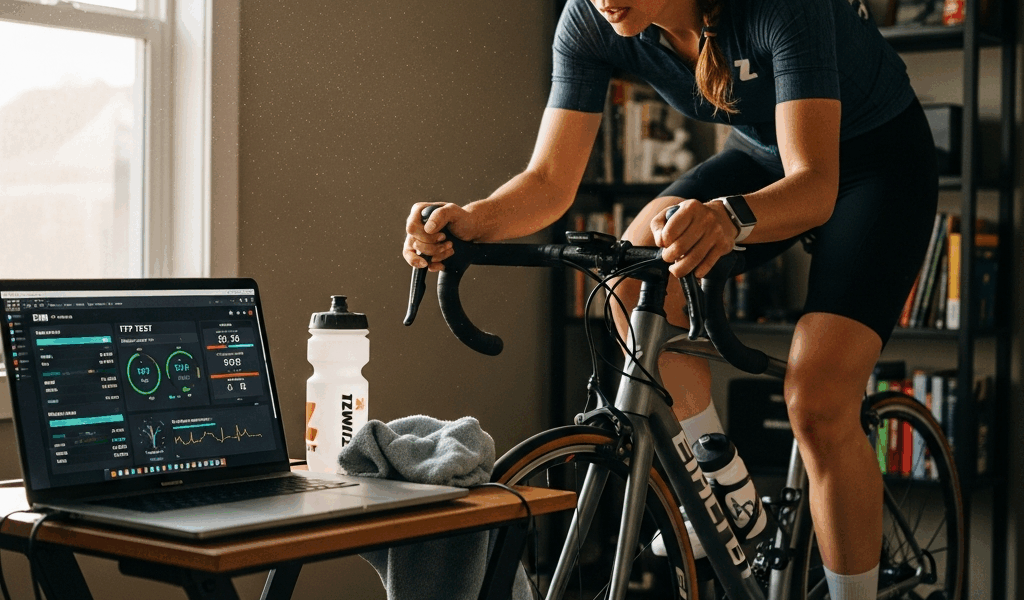
Zwift FTP Test — How to Prepare and Which Test to Pick
Zwift FTP testing has turned into a moving target with all the conflicting advice flying around. The test itself isn’t the hard part. The 48 hours before it, and picking the right format for where you are right now? That’s what trips people up. Get those wrong and your training zones drift for months before you figure out why your threshold intervals feel weirdly easy or completely impossible.
Which Zwift FTP Test Should You Take?
Zwift gives you two real options inside the workout library: the Ramp Test and the 20-Minute FTP Test. There’s an older 2×8-minute protocol floating around in some custom workout files, but the two you’ll actually find under “FTP Tests” in the Training menu are the Ramp and the 20-Minute. Picking wrong won’t destroy your training — but it does introduce noise into an already imprecise measurement.
This article includes affiliate links. We may earn a commission at no extra cost to you.
Ramp Test — Best For First-Timers and Returning Riders
But what is the Ramp Test? In essence, it’s a simple incremental format — power starts low and climbs by 20 watts every minute until you can’t hold the target anymore. But it’s much more than that. Zwift takes 75% of your best one-minute power as the FTP estimate, and the whole thing wraps up somewhere between 15 and 25 minutes depending on your fitness. The math does most of the pacing work for you. That’s genuinely useful.
Never tested before? Use the Ramp Test. Full stop. Here’s the exact scenario where it wins: you’re a newer rider — maybe six months into structured training — you’ve never held a true 20-minute maximal effort, and you have no reliable gut sense of what pace you can sustain. The Ramp Test removes the pacing guesswork entirely. You just keep pedaling until you genuinely can’t hit the next watt target. Each minute feels like its own separate challenge rather than one long sufferfest, which makes the psychological load manageable.
It also suits riders returning from a break longer than four weeks. Your fitness has shifted in ways memory can’t accurately track, and the incremental format gives you an honest read without requiring you to already know your current ceiling.
20-Minute FTP Test — Best For Experienced Riders
Quick callout up front — because most people asking which test to take are actually experienced enough for the 20-minute but default to the Ramp because it sounds easier. It isn’t easier. It just has a lower cognitive entry cost.
The format: 10-minute warmup, a 5-minute all-out effort to pre-fatigue your fast-twitch fibers, 5 minutes of recovery, then 20 minutes at the highest sustainable power you can hold. Zwift multiplies your average 20-minute power by 0.95 to get the FTP estimate.
That 5-minute blowout segment before the main interval is doing important work — it suppresses the neuromuscular contribution so your 20-minute result reflects aerobic capacity more cleanly. Riders who half-effort it tend to go out too hot in the test interval and collapse somewhere around minute 12. Save yourself the trouble I had. I once treated that 5-minute segment as a “warmup” and paid for it in the back half of the test.
This format rewards pacing discipline — something experienced riders actually have. If you’ve been training consistently for a year or more, you know what a hard sustained effort feels like, and you’ll get a more granular result than the Ramp Test’s 75% formula produces.
48-Hour Prep Protocol
The 48 hours before your test matter more than the test itself. I learned this the hard way — tested on a Tuesday after a hard Sunday group ride and a “recovery” spin Monday. The FTP number came out 18 watts below what I’d hit four weeks earlier. No illness, no fitness change. Just insufficient recovery. Here’s what the actual prep window should look like.
Rest and Ride Quality Leading Up to Test Day
No hard rides in the 48 hours before the test. That means no intervals, no threshold work, no Zwift races — which are secretly interval sessions wearing a social event costume. You can ride easy the day before: genuinely easy, Zone 1 or low Zone 2, under 65% of your current FTP, for 30 to 45 minutes. Keeps the legs from going stiff without stacking fatigue. But if you’re tired, skip it. An extra rest day costs you nothing.
Sleep matters more than most prep guides admit. Seven to nine hours the night before. Your perceived effort during the test is directly sensitive to sleep quality — and the 20-minute test especially requires continuous pacing decisions under accumulated discomfort. Tired brains quit earlier. Simple as that.
Hydration and Nutrition
Drink more water than you think you need in the 24 hours before the test. Aim for pale yellow urine by the afternoon before test day — not a complicated hydration protocol, just not starting the test already dehydrated. For the pre-test meal, eat roughly two to three hours beforehand: moderate carbohydrates, low fat, low fiber. I usually go with two slices of toast, almond butter, and a banana around 90 minutes before a morning test. Simple, digests quickly, enough glucose in the blood without that heavy-legs feeling on the bike.
Caffeine timing is specific and worth planning. If you use it regularly, take it 30 to 45 minutes before the test — a single espresso or a 100mg caffeine tablet is enough. The research on caffeine and cycling performance is one of the more robust areas in sports science; it genuinely blunts perceived exertion during hard efforts. If you never use caffeine, don’t introduce it for the test. A novel stimulant response in an already high-stress physiological situation is unpredictable, and test day is a bad day for experiments.
Fan Setup and Environment
While you won’t need a full wind tunnel setup, you will need a handful of things — and a proper fan is the non-negotiable one. Not a ceiling fan. Not a floor fan aimed vaguely upward. A box fan or a Lasko 20-inch directional fan — roughly $35 at most hardware stores — aimed at your chest and face from about three feet away. Core temperature is the primary limiter in sustained indoor efforts past 15 minutes. Without direct airflow, your power will drop in the back half of the 20-minute interval for thermoregulation reasons, not fitness reasons. That FTP number ends up artificially low.
Room temperature between 60°F and 68°F is ideal. Opening a window in a cool room is often enough. Some riders run two fans — one at the front, one off to the side — which is overkill for most people but genuinely useful if your pain cave heats up fast.
ERG Mode and Gear Selection
This is where a lot of riders make a subtle but significant setup error. The answer is simple: turn ERG mode off for FTP testing.
Why ERG Mode Works Against You in FTP Tests
ERG mode — the setting on smart trainers like the Wahoo KICKR Core or Tacx NEO 2T that automatically adjusts resistance to match a target power — is excellent for structured workouts. For FTP testing, it’s counterproductive. In the 20-minute test, ERG will try to hold you to a predetermined power target rather than letting you express your actual capacity. If your FTP is set too low coming in, ERG caps your effort. If it’s too high, you get the dreaded “ERG death spiral” — trainer cranks resistance as you slow, you slow more, resistance increases further, and suddenly the test is over before minute six.
First, you should know — at least if you’re using a smart trainer — that the Ramp Test is specifically designed to work with ERG on. Zwift controls the resistance ramp itself. The 20-minute test, though, should be done in Resistance mode or Slope mode with ERG disabled. In Zwift, toggle this by pressing the “E” key on a keyboard or through the mobile companion app during the workout.
Gear Selection Strategy
Frustrated by spinning out and grinding through resistance mode, I spent one full test in a gear combination that made cadence control nearly impossible — small ring, smallest cog, which sounds logical until you’re mashing at 65 rpm and wondering why your legs feel like concrete. Learn from what tripped me up.
For slope or resistance mode FTP testing, use your small chainring and a middle-range cassette cog — something like a 34×17 or 36×19 depending on your drivetrain. This gives you enough resistance at 85-95 rpm to produce meaningful power without taxing your neuromuscular system more than your aerobic system. Keep cadence between 85 and 95 rpm throughout the main test interval.
A direct drive trainer might be the best option here, as FTP testing requires precise, consistent resistance feel. That’s because even small drivetrain inconsistencies show up in power data when you’re holding a sustained effort for 20 minutes. Slight slope percentage adjustments in the Zwift companion app — three to five percent is a reasonable starting point for most riders in the 150 to 300 watt range — can dial in the feel from there.
Pacing the 20-Minute Test
Bad pacing ruins more FTP tests than bad fitness. The mistake is universal: you feel good in minute one, push slightly above target, feel great through minute three, you’re still over target at minute five — and then minutes eight through twelve are a slow-motion collapse you spend the final eight minutes just surviving.
The 95% Start Rule
Start at 95% of your target power, not 100%. If you’re guessing because you have no prior baseline, start conservatively — treat the first five minutes as a calibration phase, not a performance phase. The goal of minutes one through five is to arrive at minute six feeling like you could theoretically hold this forever. You won’t be able to. But that’s the sensation you’re targeting.
From minute five to minute ten, nudge power up slightly if your breathing is controlled and your legs still feel manageable. Minute ten is the decision point — genuinely feeling good means commit and push. Already struggling to maintain means hold exactly where you are and grind the second half out. Going slightly too hard from minute ten onward is recoverable. Going too hard from minute one is not.
Mental Pacing Markers
Break the interval into four five-minute blocks. Block one: conservative and controlled. Block two: find your ceiling. Block three: commit and hold. Block four: everything left in the tank. This structure matters — the 20-minute effort gets genuinely uncomfortable around minute fourteen, and having a mental framework prevents the urge to quit from feeling like a rational response to the situation.
In the final five minutes, shift focus from power output to cadence and breathing. Power will fluctuate. Cadence and breathing rhythm are things you can actively control, and keeping them stable keeps your output stable. That’s the whole trick at the end.
What Your FTP Number Means for Training
Once Zwift calculates your FTP, it automatically updates your training zones — and this number becomes the linchpin of every structured workout on the platform. A workout prescribed at 88% FTP means something specific when your FTP is accurate. When it’s off — high or low — the entire workout structure shifts in ways that leave you either undertrained or chronically overcooked without obvious explanation.
Understanding the Zones Zwift Uses
Zwift runs a seven-zone model based on Coggan power zones. Zone 1 is active recovery — under 55% FTP. Zone 2 is endurance, 56-75%. Zone 3 is tempo, 76-90%. Zone 4 is threshold, 91-105%. Zone 5 is VO2 max, 106-120%. Zone 6 is anaerobic capacity, 121-150%. Zone 7 is neuromuscular power, above 150%. Most structured plans spend the bulk of time in Zones 2, 3, and 4. The accuracy of your FTP determines whether a “threshold” interval is actually threshold work — or secretly Zone 3 cruising dressed up as something harder.
When to Retest
Retest every six to ten weeks. Six weeks if you’re in an intensive build phase and workouts are starting to feel consistently too easy. Ten weeks if you’re in a base phase with lower intensity volume. Don’t retest more frequently than every four weeks — aerobic fitness adaptations take weeks to consolidate, and testing too often generates variability without useful signal.
This new testing rhythm takes hold several years into consistent training and eventually evolves into the intuitive sense that experienced Zwifters know and rely on today — that internal clock that tells you when your zones feel genuinely off. If you finish a structured Zwift plan and the final week felt significantly easier than the first, retest before starting the next block. Starting a new training phase with an outdated FTP means prescribed intensities won’t match your actual physiology. You’ll be doing Zone 3 work when the plan intends Zone 4 — weeks of quiet drift before you figure out what’s wrong.
One practical note: don’t retest the week after a race, a high-volume weekend, or while fighting off any kind of illness. The test is a measurement tool — not a performance event. The goal is the most accurate number you can produce under controlled conditions, and controlled conditions require actual recovery, honest preparation, and a realistic respect for what the test is genuinely asking your body to do.


Stay in the loop
Get the latest cycle train central updates delivered to your inbox.